> ## Documentation Index
> Fetch the complete documentation index at: https://docs.rocket.new/llms.txt
> Use this file to discover all available pages before exploring further.
# Redesign
> Transform any website with Rocket.new Build - paste a URL, pick a redesign command, and get a rebuilt page.
export const LlmsDirective = () =>
For the complete documentation index, see llms.txt.
For a lightweight markdown version of this page, append .md to the URL.
;
Paste a URL, pick a redesign command, and describe your direction. Rocket analyzes the page and rebuilds it with a new look, improved conversion, or brand-matched design.
Redesign commands are available when starting a new Build task from the homepage, not inside an existing project.
## How to get started
Visit **[rocket.new](https://rocket.new)** and sign in. On the homepage, click **Build** to start a new Build task.
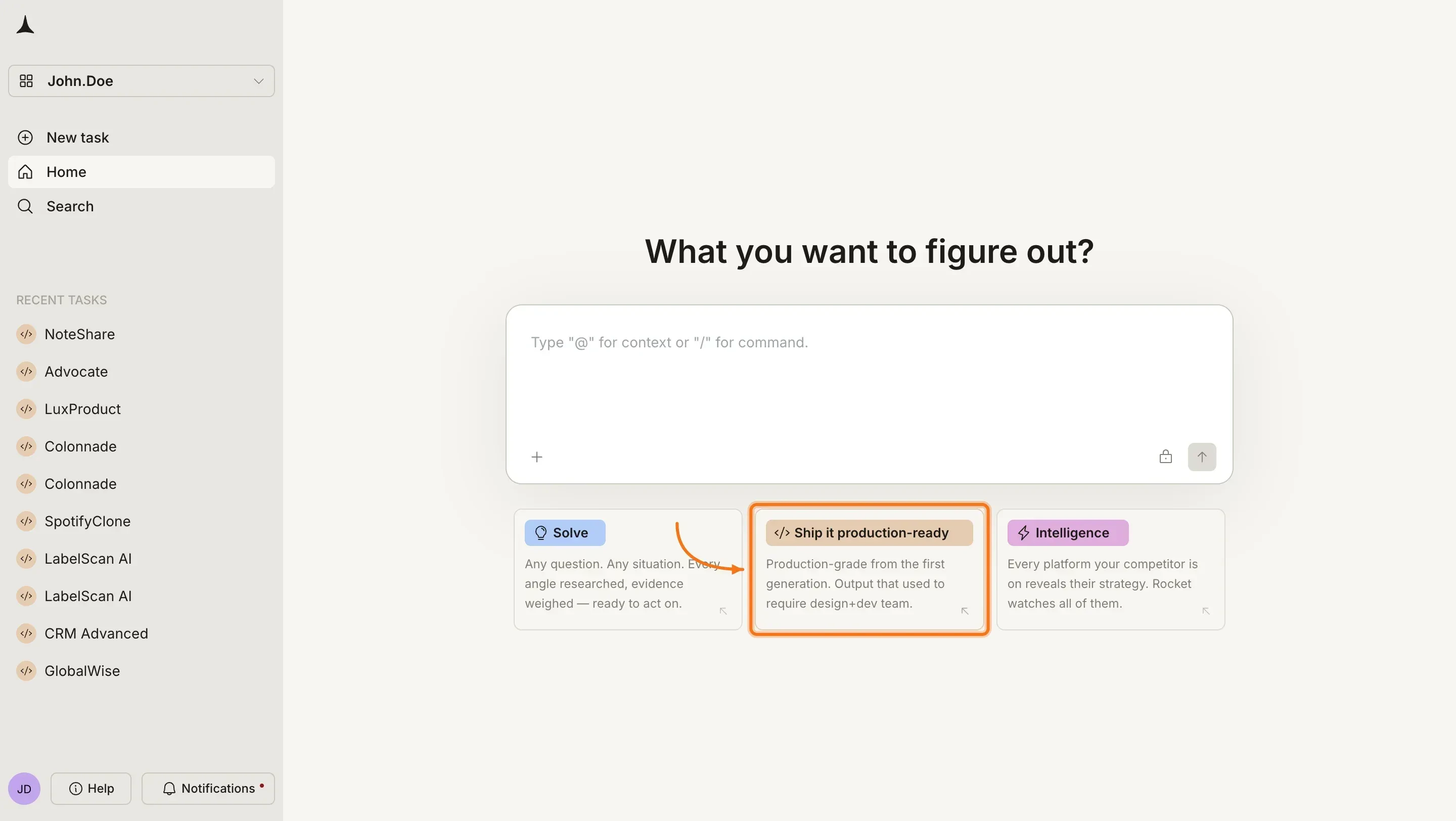
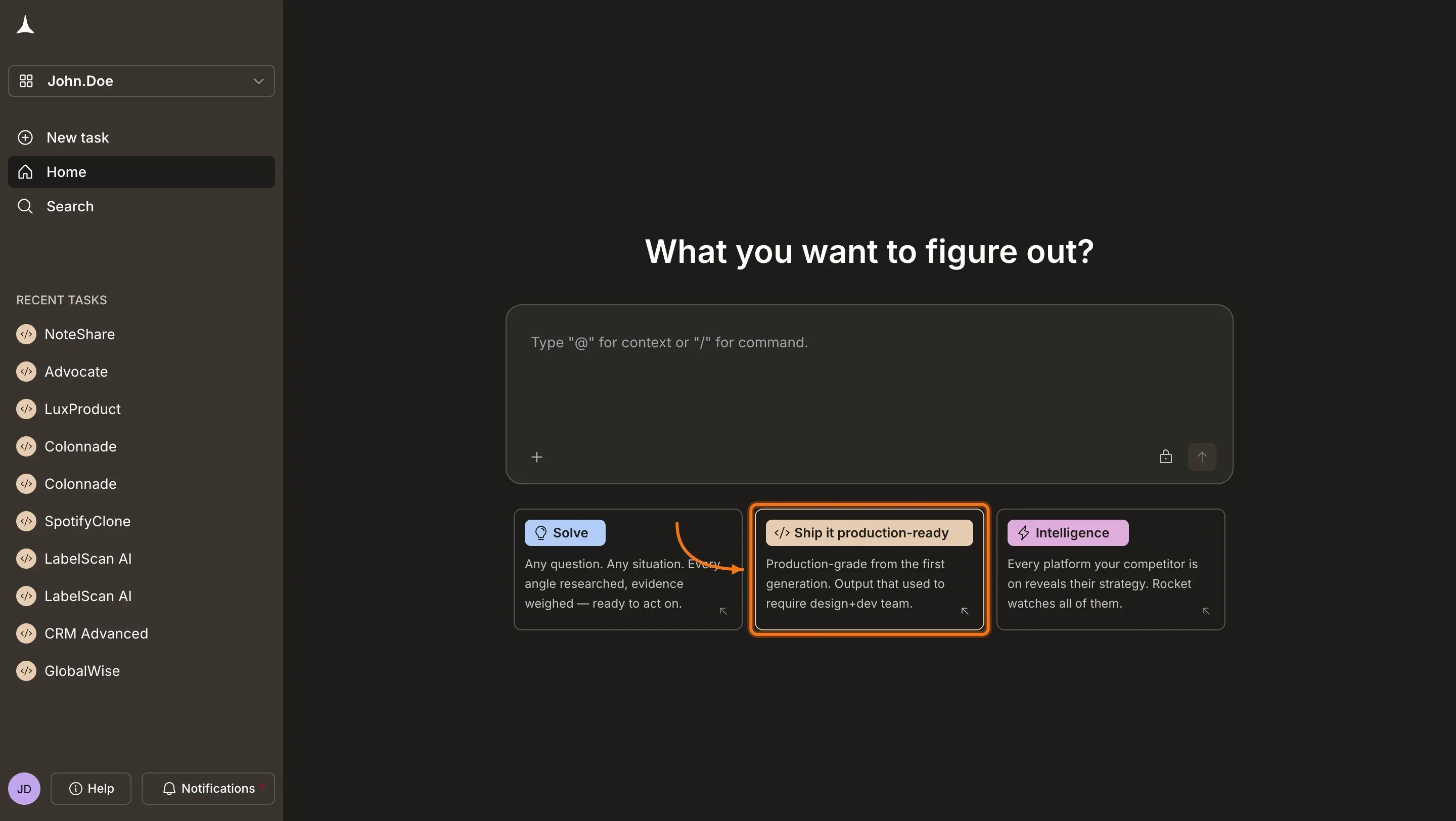 Type `/` in the chat input. The command menu opens. Browse by category or start typing to filter, then select a redesign command.
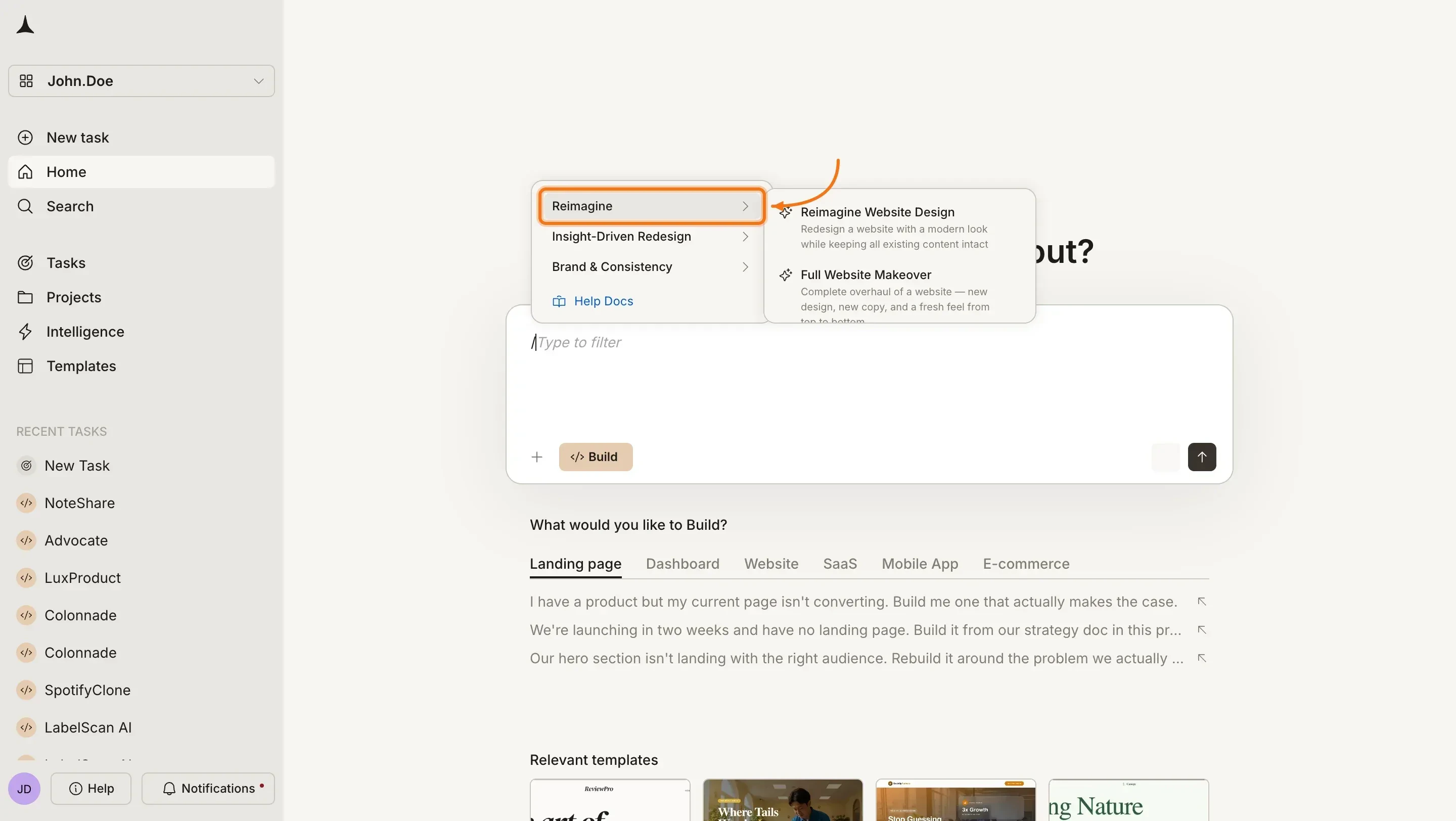
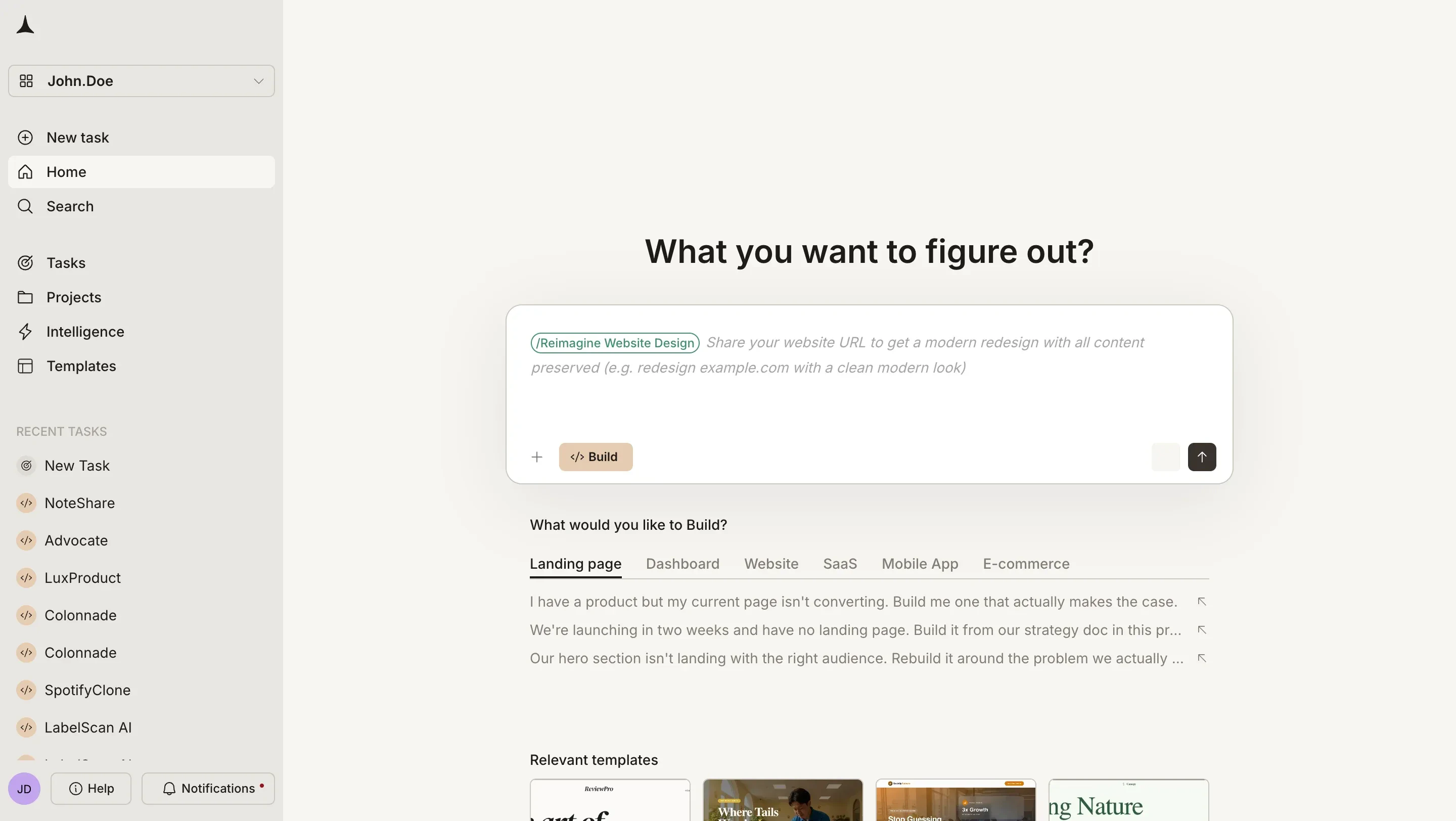
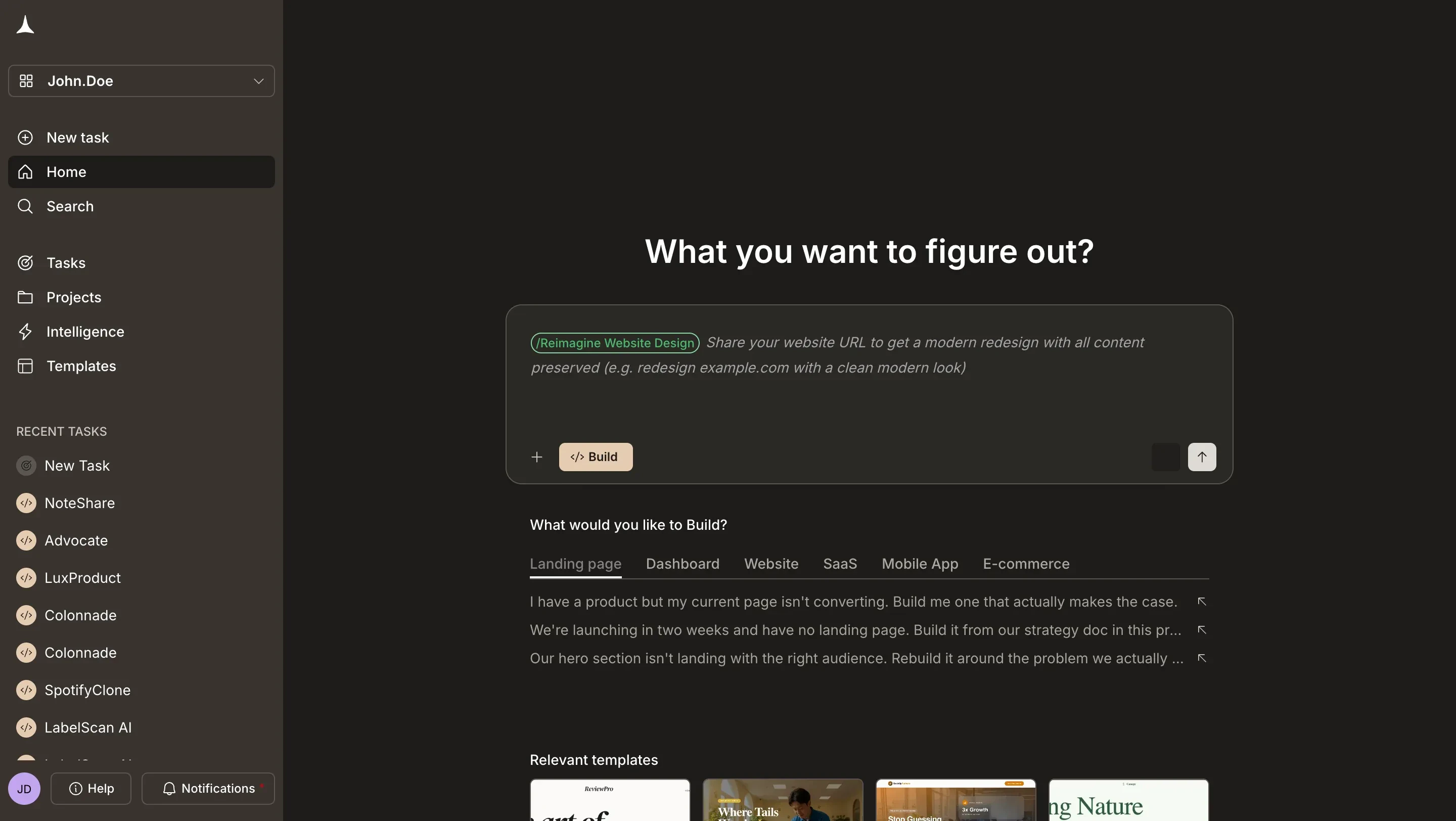
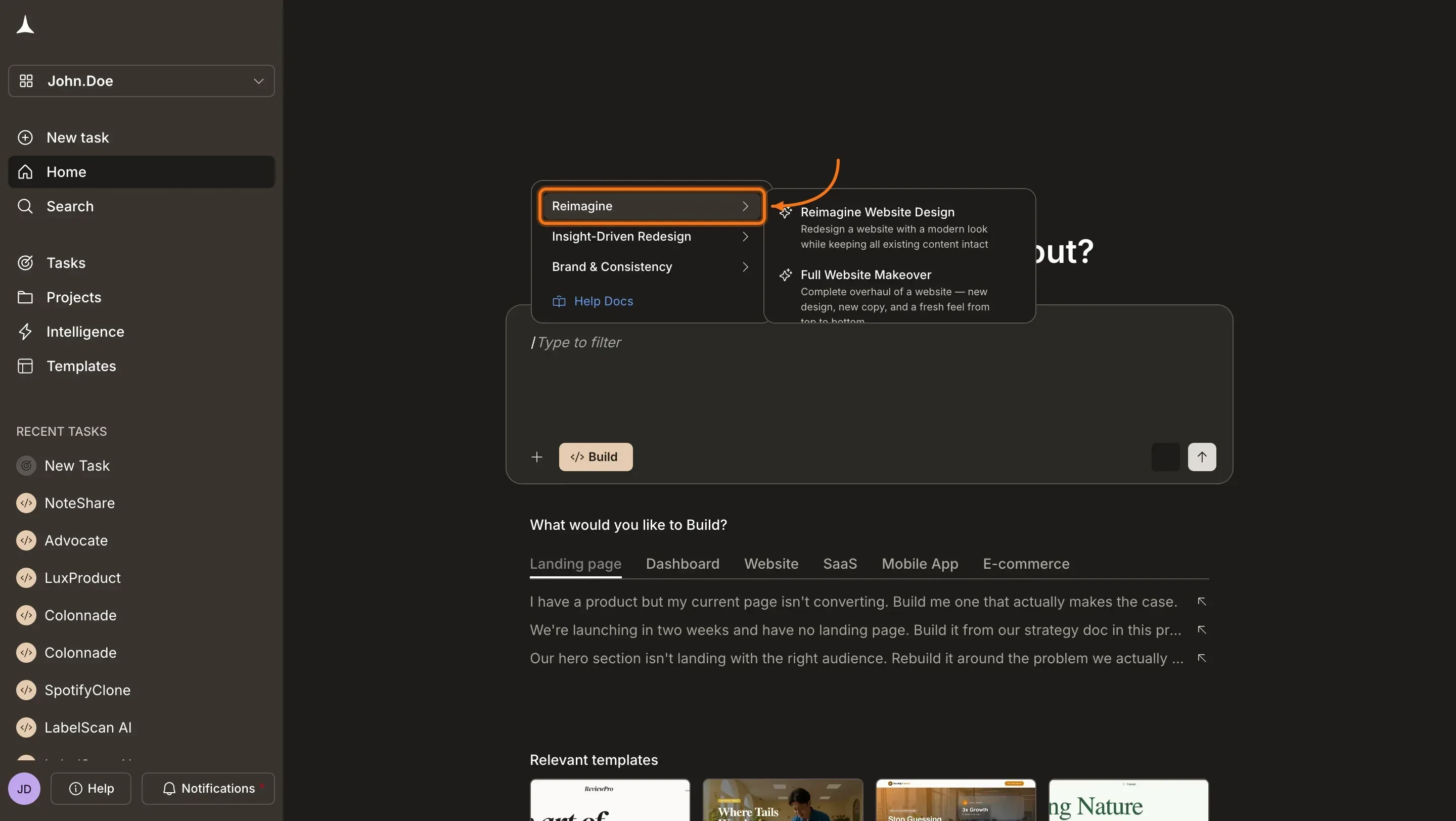 After selecting a command, paste the URL of the site you want to redesign into the input. Add a short description of what you want: visual style, tone, what to keep, what to change. Use the prompts below as a starting point.
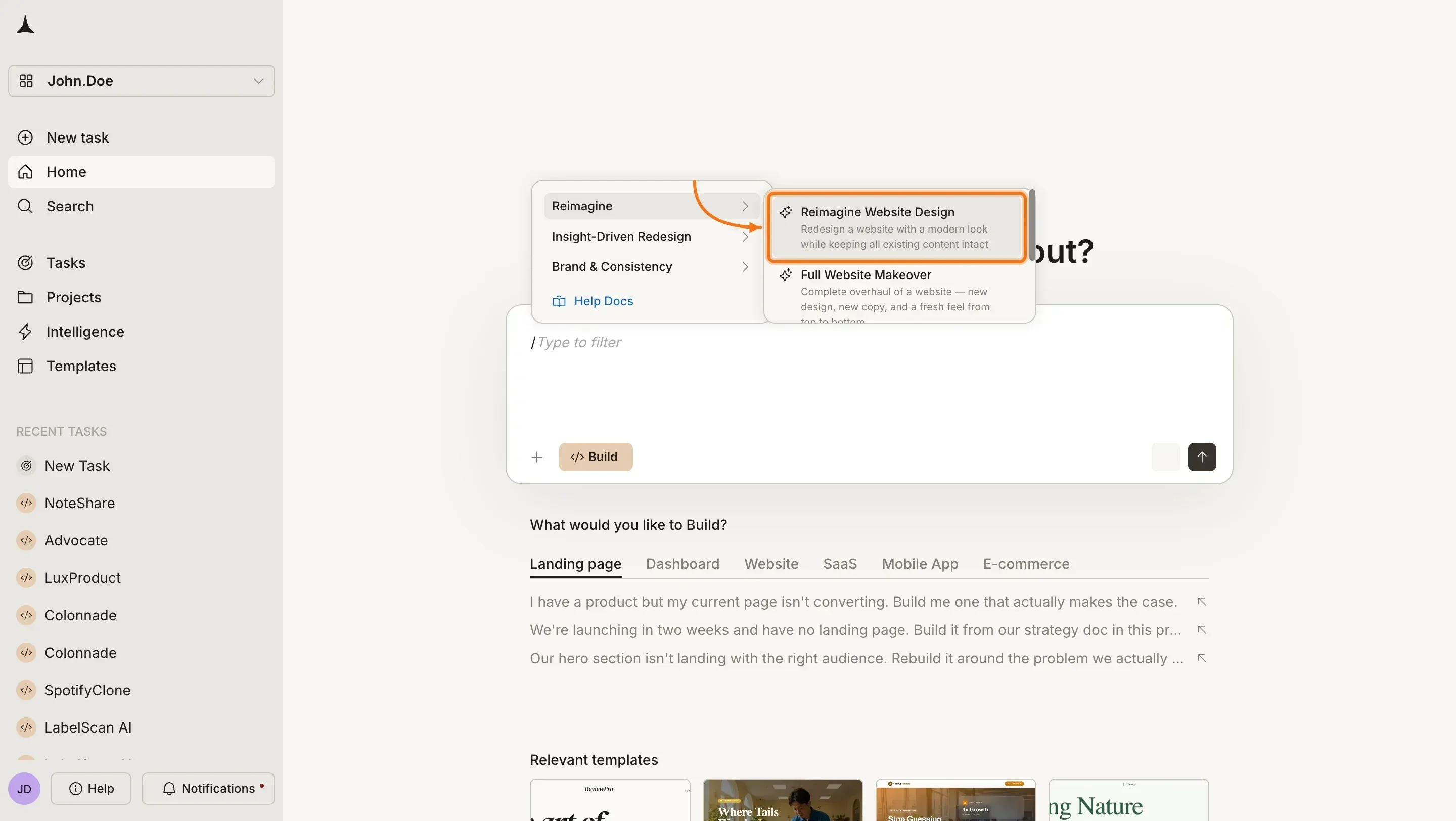
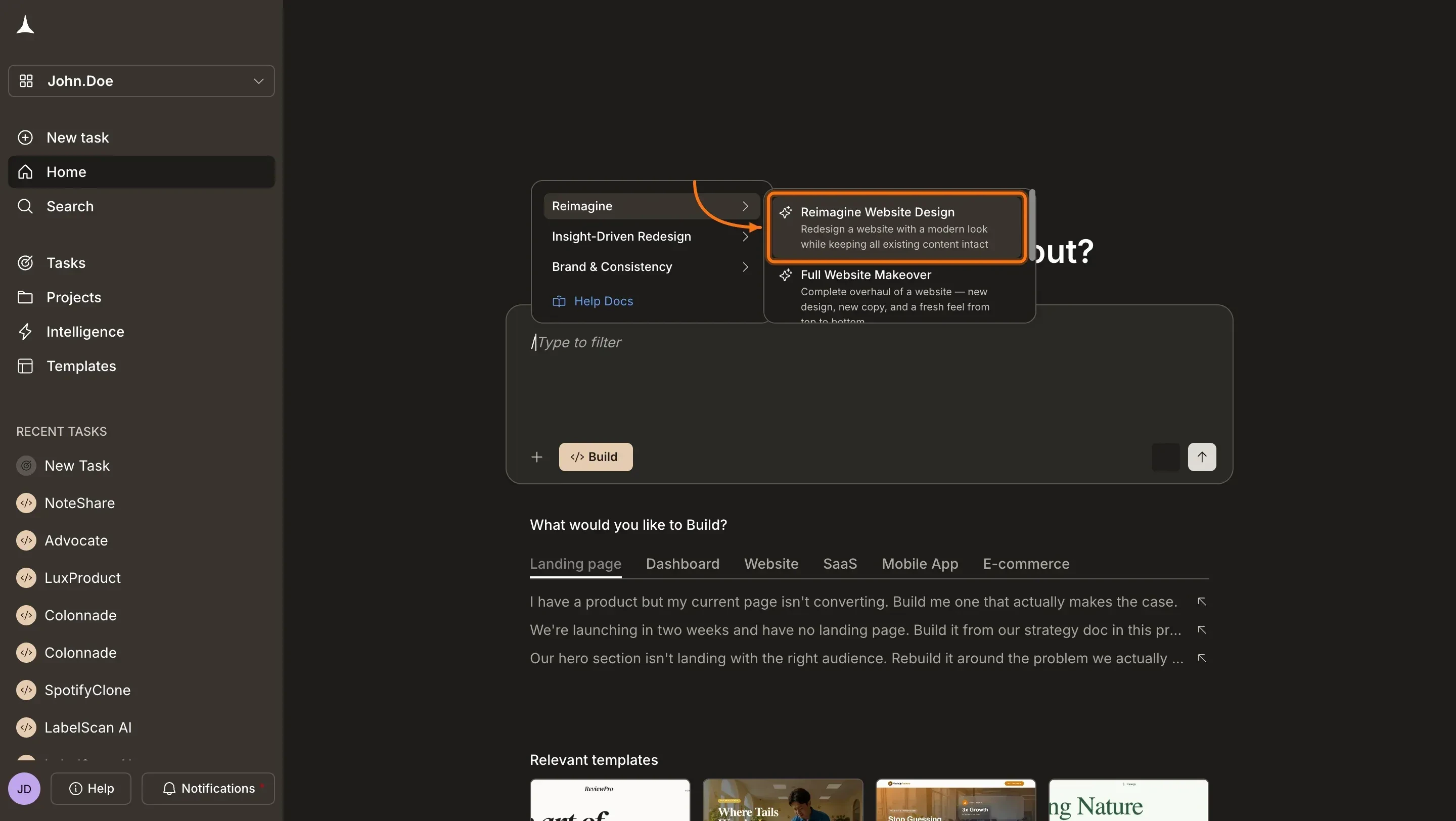 Choose your redesign command from the list, confirm your prompt, and click the send button or press Enter. Rocket analyzes the page and starts rebuilding it.
 ## Visual refresh
Use these commands when you want a fresh look: modern styling, a complete overhaul, or a mobile-first layout.
Redesign a website with a modern look while keeping all existing content intact.
**Best for:** Sites that look dated but have good content and structure.
**Try this prompt:**
```plaintext wrap theme={null}
/Reimagine Website Design https://example.com - Clean, modern look. Generous whitespace, refined color palette, updated typography. Keep all existing content and structure.
```
Complete overhaul with a new design, new copy, and a fresh feel from top to bottom.
**Best for:** Sites that need both a visual refresh and stronger messaging.
**Try this prompt:**
```plaintext wrap theme={null}
/Full Website Makeover https://example.com - Bold sans-serif typography, dark theme. Rewrite the hero and CTA copy to be more direct and conversion-focused.
```
Redesign a website with mobile as the primary experience: single-column layouts, large tap targets, thumb-friendly navigation, and graceful desktop scaling.
**Best for:** Sites with high mobile traffic but a desktop-first layout.
**Try this prompt:**
```plaintext wrap theme={null}
/Mobile-First Redesign https://example.com - Single-column layout, large tap targets, sticky CTA at the bottom, simplified navigation. Scale gracefully to desktop.
```
## Insight-driven redesign
Use these commands when you have data (heatmaps, analytics, or conversion metrics) and want to redesign based on what is underperforming.
Redesign a page layout based on heatmap data: reposition CTAs to high-attention zones, remove ignored sections, and fix drop-off areas.
**Best for:** Teams with Hotjar, Clarity, or similar heatmap data who want to act on it.
**Try this prompt:**
```plaintext wrap theme={null}
/Redesign from Heatmap https://example.com - Primary CTA should move above the fold to the top-right attention zone. The hero section gets the most attention so make it stronger. Pricing table is the main conversion goal, make it the focal point.
```
Rebuild a page that solves clarity, CTA visibility, social proof placement, and objection flow.
**Best for:** Landing pages or pricing pages with low conversion rates.
**Try this prompt:**
```plaintext wrap theme={null}
/Fix Conversion Issues https://example.com - CTA needs to be more prominent above the fold. Add social proof near the signup button. Simplify the pricing comparison and reduce friction in the form.
```
Rebuild a page that corrects visual hierarchy problems: make overlooked CTAs, headings, or key sections impossible to miss.
**Best for:** Pages where users are not seeing or acting on the most important elements.
**Try this prompt:**
```plaintext wrap theme={null}
/Fix Visual Hierarchy https://example.com - The main heading should be the most prominent element. CTA needs to stand out clearly against the background. Secondary content should visually recede. Use size, color, and spacing to guide the eye top to bottom.
```
## Brand & consistency
Use these commands when you want to match a specific design language, whether your own brand system or a reference site's aesthetic.
Generate a new page that visually matches the design system of a reference URL: colors, typography, spacing, and component style.
**Best for:** Building new pages that need to match an existing brand or design system.
**Try this prompt:**
```plaintext wrap theme={null}
/Generate Brand-Matched Page https://example.com - Generate a new pricing page that matches this site's design system exactly. Same color palette, typography scale, card styles, and spacing rhythm.
```
Redesign a website to match a competitor's design style: same content, new visual language inspired by the reference site.
**Best for:** Teams who want to adopt a competitor's visual direction while keeping their own content and messaging.
**Try this prompt:**
```plaintext wrap theme={null}
/Redesign Like Competitor https://example.com - Match the visual style of stripe.com. Dark background, clean grid, subtle gradients, precise typography. Keep all existing content and messaging.
```
## Writing better prompts
Vague prompts produce generic results. Be specific about what you want:
| Instead of | Try |
| :--------------------- | :-------------------------------------------------------------------------------- |
| "Make it look modern" | "Dark background, clean sans-serif, gradient accents, ample whitespace" |
| "Make it professional" | "Corporate style, navy/white palette, structured grid, subtle shadows" |
| "Make it minimal" | "White background, single accent color, generous margins, no decorative elements" |
Naming specific design references gives Rocket a concrete target:
* "Inspired by Stripe: clean gradients, floating UI, polished tech aesthetic"
* "Similar to Notion: warm, friendly, rounded corners, soft colors"
* "Like Linear's dark theme: stark black, sharp typography, neon accents"
Being explicit about what stays and what changes prevents Rocket from altering things you want left alone:
```plaintext wrap theme={null}
KEEP: All pricing tier names, features, and prices. The annual/monthly toggle. The FAQ section.
CHANGE: Replace blue with a dark theme (#0F172A background, #38BDF8 accent). Card layout instead of table. Make the recommended plan visually prominent.
```
Exact values produce exact results. Include hex codes, font names, and spacing values when you know them:
`#1E293B background`, `Inter for body text`, `Cal Sans for headings`, `80px section padding`, `48px heading size`.
## What's next?
Refine your redesigned page using natural language prompts.
Click any element to adjust text, colors, spacing, or images directly.
Make sure your rebuilt site ranks well after the redesign.
Publish your redesigned page and connect a custom domain.
## Visual refresh
Use these commands when you want a fresh look: modern styling, a complete overhaul, or a mobile-first layout.
Redesign a website with a modern look while keeping all existing content intact.
**Best for:** Sites that look dated but have good content and structure.
**Try this prompt:**
```plaintext wrap theme={null}
/Reimagine Website Design https://example.com - Clean, modern look. Generous whitespace, refined color palette, updated typography. Keep all existing content and structure.
```
Complete overhaul with a new design, new copy, and a fresh feel from top to bottom.
**Best for:** Sites that need both a visual refresh and stronger messaging.
**Try this prompt:**
```plaintext wrap theme={null}
/Full Website Makeover https://example.com - Bold sans-serif typography, dark theme. Rewrite the hero and CTA copy to be more direct and conversion-focused.
```
Redesign a website with mobile as the primary experience: single-column layouts, large tap targets, thumb-friendly navigation, and graceful desktop scaling.
**Best for:** Sites with high mobile traffic but a desktop-first layout.
**Try this prompt:**
```plaintext wrap theme={null}
/Mobile-First Redesign https://example.com - Single-column layout, large tap targets, sticky CTA at the bottom, simplified navigation. Scale gracefully to desktop.
```
## Insight-driven redesign
Use these commands when you have data (heatmaps, analytics, or conversion metrics) and want to redesign based on what is underperforming.
Redesign a page layout based on heatmap data: reposition CTAs to high-attention zones, remove ignored sections, and fix drop-off areas.
**Best for:** Teams with Hotjar, Clarity, or similar heatmap data who want to act on it.
**Try this prompt:**
```plaintext wrap theme={null}
/Redesign from Heatmap https://example.com - Primary CTA should move above the fold to the top-right attention zone. The hero section gets the most attention so make it stronger. Pricing table is the main conversion goal, make it the focal point.
```
Rebuild a page that solves clarity, CTA visibility, social proof placement, and objection flow.
**Best for:** Landing pages or pricing pages with low conversion rates.
**Try this prompt:**
```plaintext wrap theme={null}
/Fix Conversion Issues https://example.com - CTA needs to be more prominent above the fold. Add social proof near the signup button. Simplify the pricing comparison and reduce friction in the form.
```
Rebuild a page that corrects visual hierarchy problems: make overlooked CTAs, headings, or key sections impossible to miss.
**Best for:** Pages where users are not seeing or acting on the most important elements.
**Try this prompt:**
```plaintext wrap theme={null}
/Fix Visual Hierarchy https://example.com - The main heading should be the most prominent element. CTA needs to stand out clearly against the background. Secondary content should visually recede. Use size, color, and spacing to guide the eye top to bottom.
```
## Brand & consistency
Use these commands when you want to match a specific design language, whether your own brand system or a reference site's aesthetic.
Generate a new page that visually matches the design system of a reference URL: colors, typography, spacing, and component style.
**Best for:** Building new pages that need to match an existing brand or design system.
**Try this prompt:**
```plaintext wrap theme={null}
/Generate Brand-Matched Page https://example.com - Generate a new pricing page that matches this site's design system exactly. Same color palette, typography scale, card styles, and spacing rhythm.
```
Redesign a website to match a competitor's design style: same content, new visual language inspired by the reference site.
**Best for:** Teams who want to adopt a competitor's visual direction while keeping their own content and messaging.
**Try this prompt:**
```plaintext wrap theme={null}
/Redesign Like Competitor https://example.com - Match the visual style of stripe.com. Dark background, clean grid, subtle gradients, precise typography. Keep all existing content and messaging.
```
## Writing better prompts
Vague prompts produce generic results. Be specific about what you want:
| Instead of | Try |
| :--------------------- | :-------------------------------------------------------------------------------- |
| "Make it look modern" | "Dark background, clean sans-serif, gradient accents, ample whitespace" |
| "Make it professional" | "Corporate style, navy/white palette, structured grid, subtle shadows" |
| "Make it minimal" | "White background, single accent color, generous margins, no decorative elements" |
Naming specific design references gives Rocket a concrete target:
* "Inspired by Stripe: clean gradients, floating UI, polished tech aesthetic"
* "Similar to Notion: warm, friendly, rounded corners, soft colors"
* "Like Linear's dark theme: stark black, sharp typography, neon accents"
Being explicit about what stays and what changes prevents Rocket from altering things you want left alone:
```plaintext wrap theme={null}
KEEP: All pricing tier names, features, and prices. The annual/monthly toggle. The FAQ section.
CHANGE: Replace blue with a dark theme (#0F172A background, #38BDF8 accent). Card layout instead of table. Make the recommended plan visually prominent.
```
Exact values produce exact results. Include hex codes, font names, and spacing values when you know them:
`#1E293B background`, `Inter for body text`, `Cal Sans for headings`, `80px section padding`, `48px heading size`.
## What's next?
Refine your redesigned page using natural language prompts.
Click any element to adjust text, colors, spacing, or images directly.
Make sure your rebuilt site ranks well after the redesign.
Publish your redesigned page and connect a custom domain.