> ## Documentation Index
> Fetch the complete documentation index at: https://docs.rocket.new/llms.txt
> Use this file to discover all available pages before exploring further.

# Share as web preview

> Deploy your Rocket.new mobile app as a browser-accessible web preview for instant sharing and testing.

export const LlmsDirective = () => <blockquote className="llms-directive">
    For the complete documentation index, see <a href="/llms.txt">llms.txt</a>.
    For a lightweight markdown version of this page, append .md to the URL.
  </blockquote>;

<LlmsDirective />

Rocket deploys your mobile app as a browser-accessible web preview that anyone can open without installing anything. This is useful for sharing with testers, stakeholders, or clients without waiting for [App Store](/build/launch-mobile/apple-store) or [Google Play](/build/launch-mobile/google-play) review. You can push updates to the same URL at any time.

<Note>
  Mobile apps are always hosted on Rocket's Netlify account. You cannot connect your own Netlify account or a custom domain for mobile app web previews.
</Note>

## Steps

<Tabs>
  <Tab title="Web Browser">
    <Steps>
      <Step title="Click Launch">
        Click the **Launch** button in the top-right corner of your task. A popup appears with the **Rocket hosted** tab already selected.
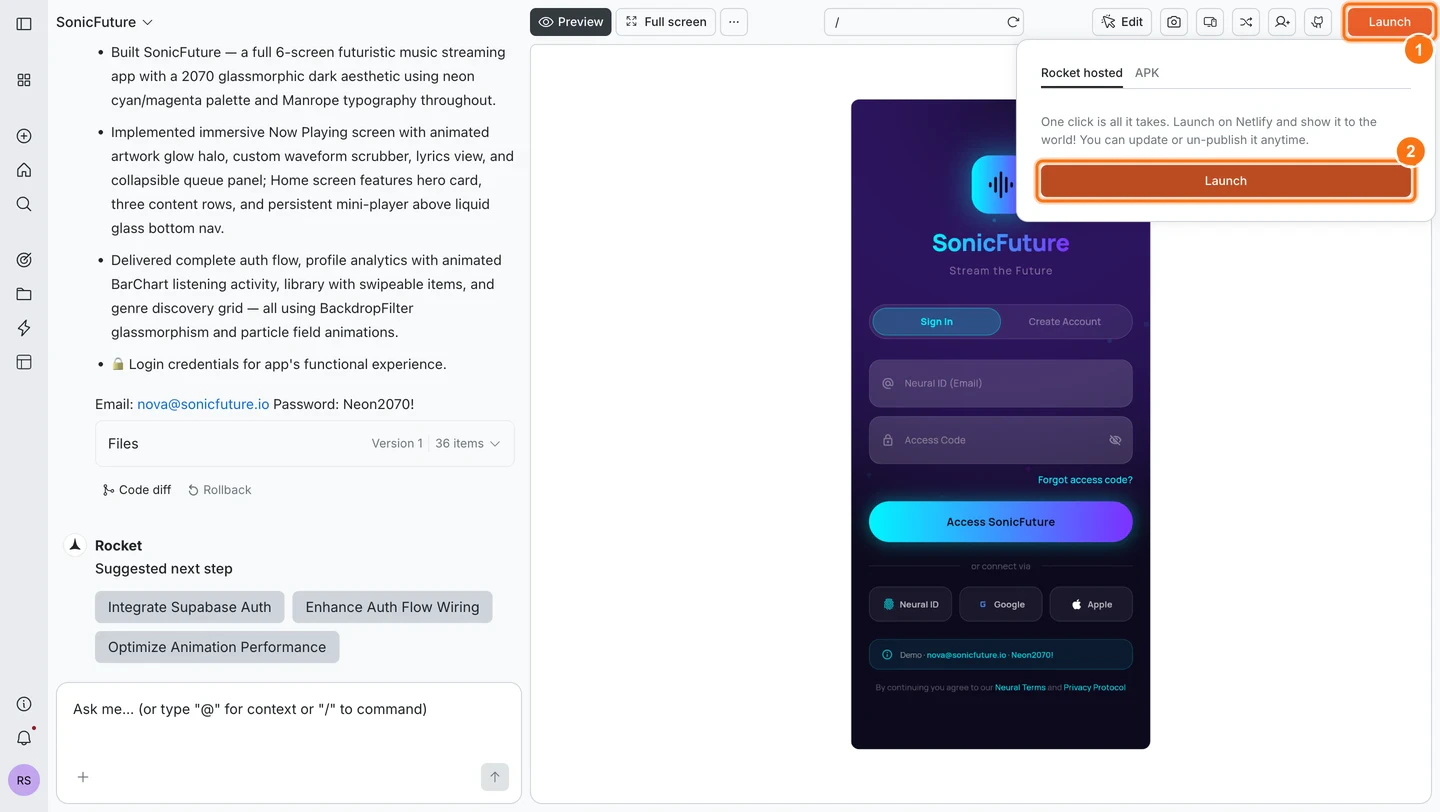
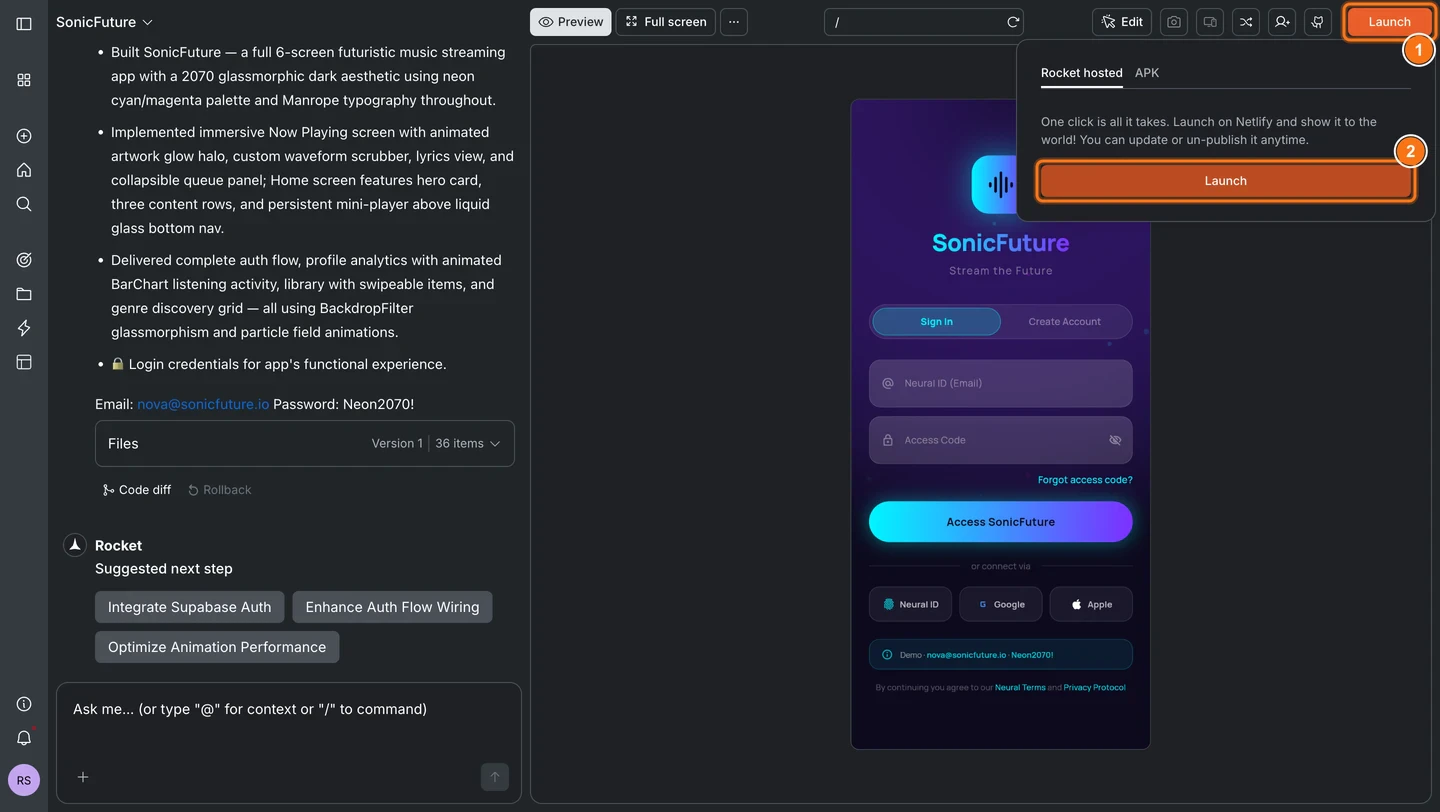
        <Frame caption="Rocket hosted popup with Launch button">
          <img src="https://mintcdn.com/dhiwisepvtltd-5e04e6a4/V8n5a5SD5I4rMm7t/images/build-docs/launch-mobile/share-as-web-preview/web-browser/rocket-hosted-popup-light.webp?fit=max&auto=format&n=V8n5a5SD5I4rMm7t&q=85&s=a163082bc90c9c37ed47d52eb8985e90" alt="Launch popup showing the Rocket hosted tab selected with a Launch button." className="theme-image light-image" width="1440" height="812" data-path="images/build-docs/launch-mobile/share-as-web-preview/web-browser/rocket-hosted-popup-light.webp" />

          <img src="https://mintcdn.com/dhiwisepvtltd-5e04e6a4/SjTE8D-vvYrzhPjv/images/build-docs/launch-mobile/share-as-web-preview/web-browser/rocket-hosted-popup-dark.webp?fit=max&auto=format&n=SjTE8D-vvYrzhPjv&q=85&s=2e7377cb7635aa674e814cf71417b2df" alt="Launch popup showing the Rocket hosted tab selected with a Launch button." className="theme-image dark-image" width="1440" height="812" data-path="images/build-docs/launch-mobile/share-as-web-preview/web-browser/rocket-hosted-popup-dark.webp" />
        </Frame>
      </Step>

      <Step title="Click Launch in the popup">
        Click **Launch**. Rocket deploys your app and shows a loading spinner while it is running.
      </Step>

      <Step title="Copy your live URL">
        When deployment finishes, your public URL appears with a **Copy** button. Share this link with anyone. No app install is needed to open it.
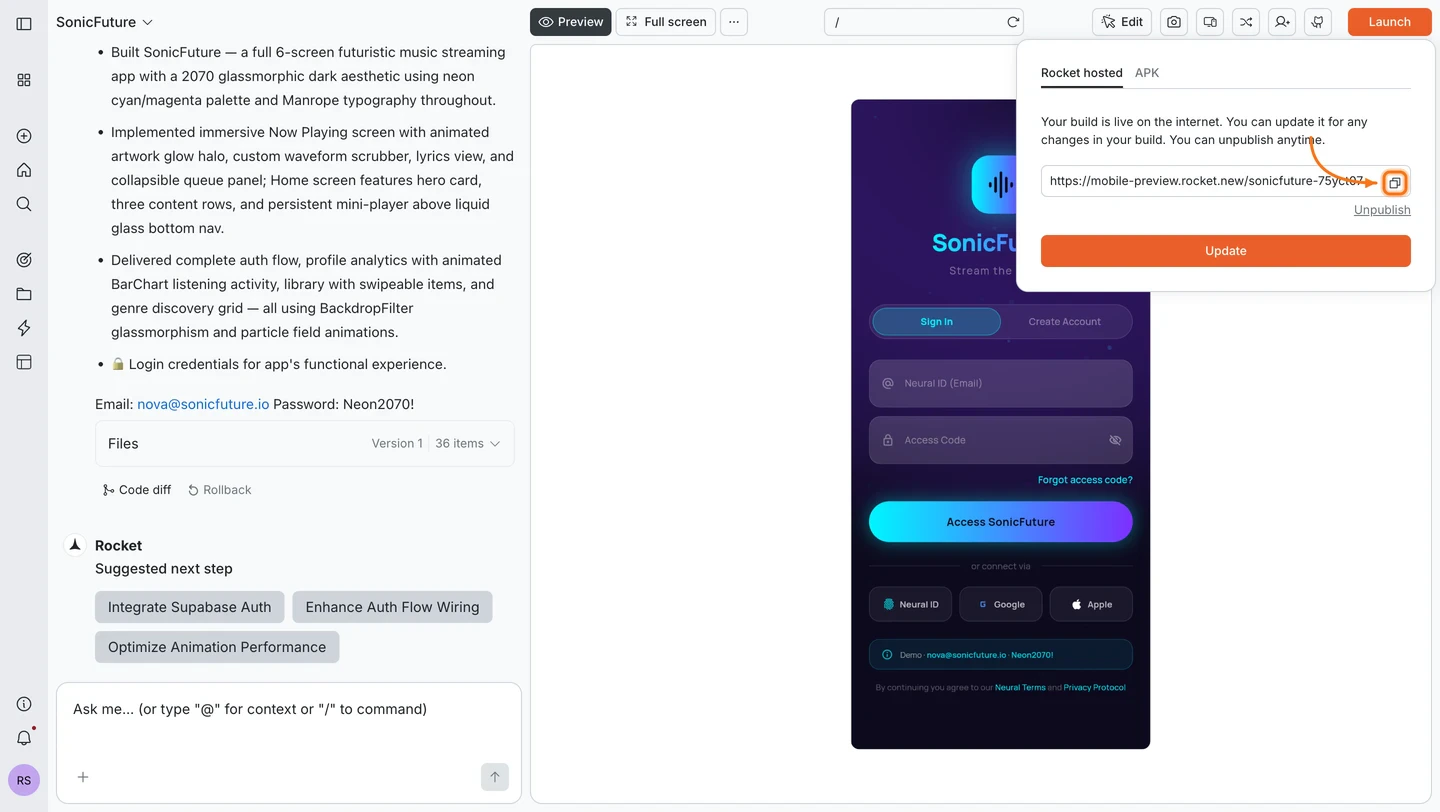
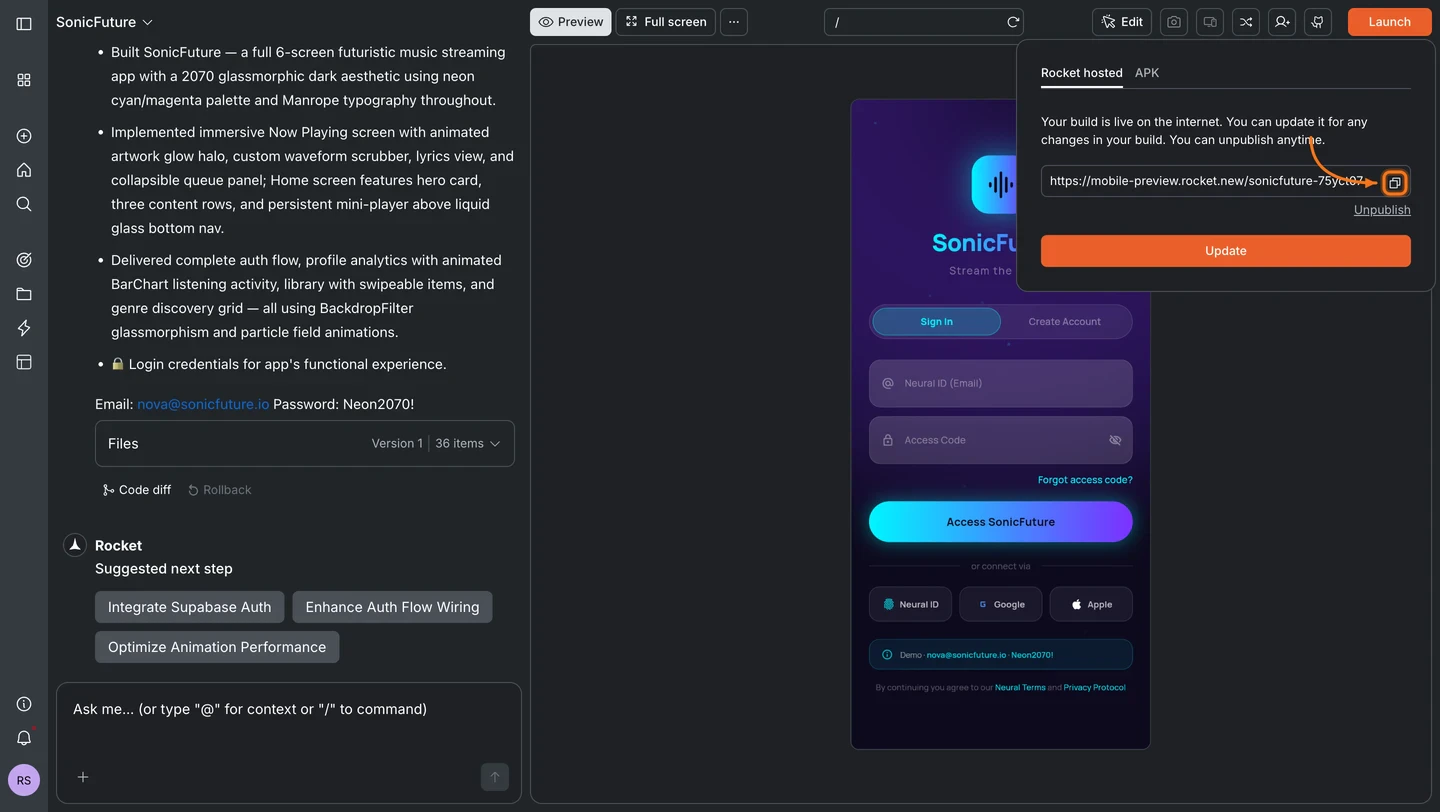
        <Frame caption="Live URL with copy button">
          <img src="https://mintcdn.com/dhiwisepvtltd-5e04e6a4/SjTE8D-vvYrzhPjv/images/build-docs/launch-mobile/share-as-web-preview/web-browser/launch-url-copy-light.webp?fit=max&auto=format&n=SjTE8D-vvYrzhPjv&q=85&s=9bcc025d9ca96af347842a575e8c1e31" alt="Deployed app URL shown with a Copy button after launch completes." className="theme-image light-image" width="1440" height="812" data-path="images/build-docs/launch-mobile/share-as-web-preview/web-browser/launch-url-copy-light.webp" />

          <img src="https://mintcdn.com/dhiwisepvtltd-5e04e6a4/SjTE8D-vvYrzhPjv/images/build-docs/launch-mobile/share-as-web-preview/web-browser/launch-url-copy-dark.webp?fit=max&auto=format&n=SjTE8D-vvYrzhPjv&q=85&s=1b174e4cb8f97d86190b680e4cf6652c" alt="Deployed app URL shown with a Copy button after launch completes." className="theme-image dark-image" width="1440" height="812" data-path="images/build-docs/launch-mobile/share-as-web-preview/web-browser/launch-url-copy-dark.webp" />
        </Frame>

        <Note>
          Mobile apps are always hosted on Rocket's Netlify account. See the note at the top of this page for details.
        </Note>
      </Step>

      <Step title="Update or unpublish">
        Click **Launch** again at any time to return to the popup.

        * Click **Update** to push your latest changes to the same URL.
        * Click **Unpublish** to remove the app and disable the public link (paid plan required).
      </Step>
    </Steps>
  </Tab>

  <Tab title="Mobile App">
    <Steps>
      <Step title="Open the More tab">
        Open your project in the Rocket mobile app and tap **More** at the bottom of the screen.
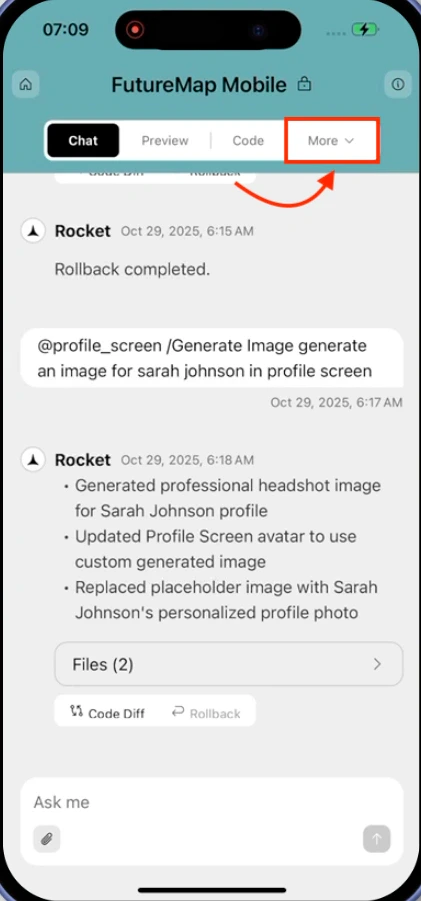
        <Frame caption="More tab in the navigation bar">
          <img src="https://mintcdn.com/dhiwisepvtltd-5e04e6a4/SjTE8D-vvYrzhPjv/images/build-docs/launch-mobile/share-as-web-preview/mobile-app/more-tab-at-rocket-app.webp?fit=max&auto=format&n=SjTE8D-vvYrzhPjv&q=85&s=c52749b0e37a389485c00e3de47c5dd5" alt="More tab highlighted in the navigation bar at the bottom of the screen." className="theme-mobile-image" width="421" height="901" data-path="images/build-docs/launch-mobile/share-as-web-preview/mobile-app/more-tab-at-rocket-app.webp" />
        </Frame>
      </Step>

      <Step title="Tap Launch on Netlify">
        In the settings modal, tap **Launch on Netlify**.
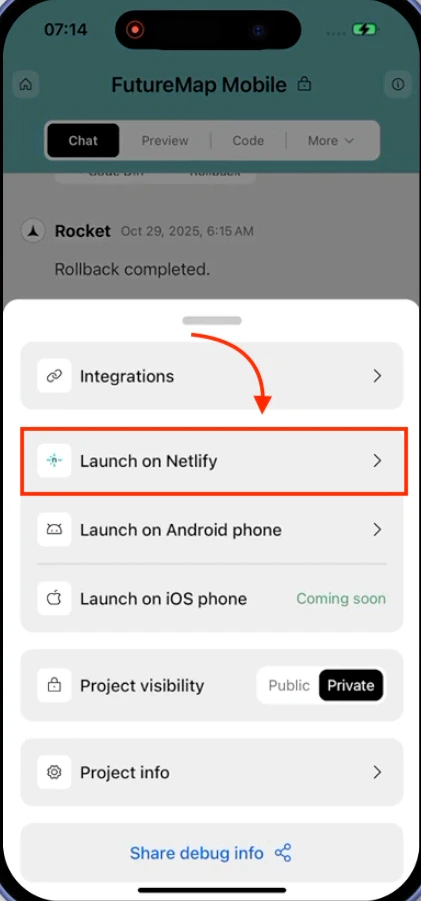
        <Frame caption="Project settings modal with Launch on Netlify option">
          <img src="https://mintcdn.com/dhiwisepvtltd-5e04e6a4/SjTE8D-vvYrzhPjv/images/build-docs/launch-mobile/share-as-web-preview/mobile-app/project-settings-modal-in-rocket-app.webp?fit=max&auto=format&n=SjTE8D-vvYrzhPjv&q=85&s=2a72fc364f98d0ff144f354ce2e3f454" alt="Project settings modal showing Launch on Netlify option highlighted." className="theme-mobile-image" width="421" height="901" data-path="images/build-docs/launch-mobile/share-as-web-preview/mobile-app/project-settings-modal-in-rocket-app.webp" />
        </Frame>
      </Step>

      <Step title="Tap Launch">
        Tap **Launch** to start deployment. The button changes to **Launching** while Rocket deploys your app.
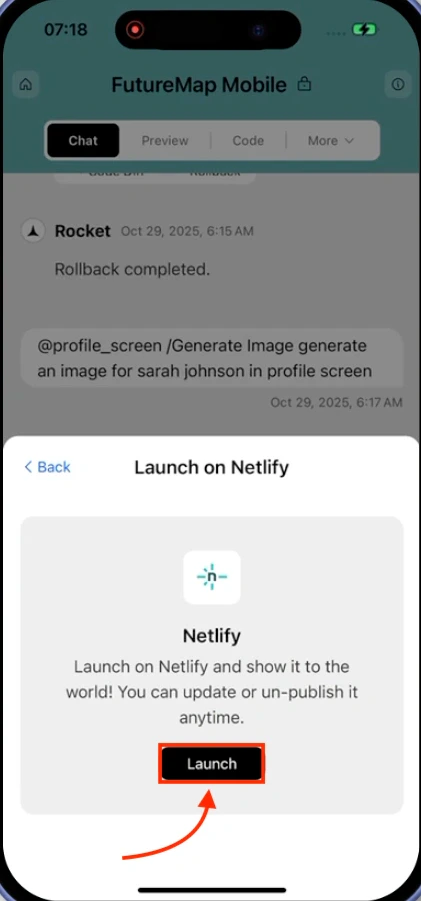
        <Frame caption="Launch on Netlify modal with Launch button">
          <img src="https://mintcdn.com/dhiwisepvtltd-5e04e6a4/SjTE8D-vvYrzhPjv/images/build-docs/launch-mobile/share-as-web-preview/mobile-app/launch-netlify-modals-in-rocket-app.webp?fit=max&auto=format&n=SjTE8D-vvYrzhPjv&q=85&s=02382e2260c073d2234fea90fc56dc14" alt="Launch on Netlify modal showing Netlify logo and Launch button." className="theme-mobile-image" width="421" height="901" data-path="images/build-docs/launch-mobile/share-as-web-preview/mobile-app/launch-netlify-modals-in-rocket-app.webp" />
        </Frame>
      </Step>

      <Step title="Copy and share your link">
        When deployment finishes, you see a confirmation screen with your public link. Tap **Copy and share link** to share it. Use **Update** to push new changes or **Unpublish** (paid plan required) to take it offline.
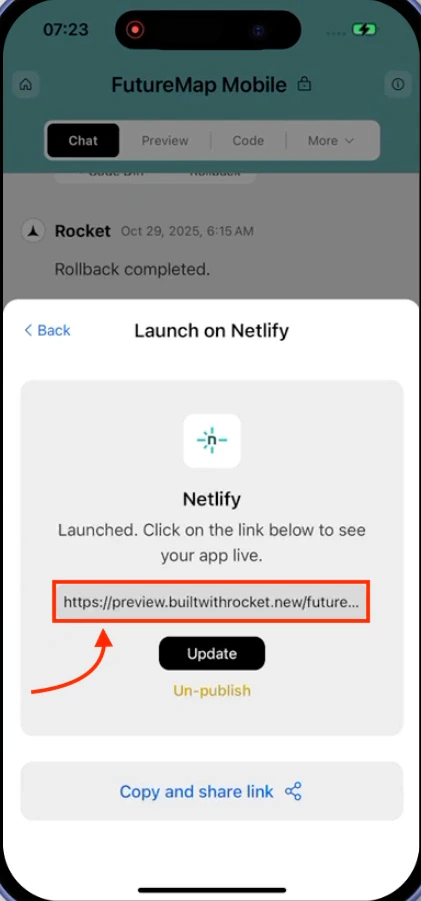
        <Frame caption="Published app with live link and controls">
          <img src="https://mintcdn.com/dhiwisepvtltd-5e04e6a4/SjTE8D-vvYrzhPjv/images/build-docs/launch-mobile/share-as-web-preview/mobile-app/mobile-app-published-in-rocket-app.webp?fit=max&auto=format&n=SjTE8D-vvYrzhPjv&q=85&s=219a577a86fbb4e3bd726bbc9f0cfa05" alt="Published app confirmation showing live link and controls to update or unpublish." className="theme-mobile-image" width="421" height="901" data-path="images/build-docs/launch-mobile/share-as-web-preview/mobile-app/mobile-app-published-in-rocket-app.webp" />
        </Frame>

        <Note>
          Mobile apps are always hosted on Rocket's Netlify account. See the note at the top of this page for details.
        </Note>
      </Step>
    </Steps>
  </Tab>
</Tabs>

## What's next?

<CardGroup cols={2}>
  <Card title="Download and install APK" icon="download" href="/build/launch-mobile/android-apk">
    Build a native Android package for device testing or direct distribution.
  </Card>

  <Card title="Compare distribution options" icon="scale-balanced" href="/build/launch-mobile/sharing-vs-stores">
    Decide between web links, APK builds, and app store submissions.
  </Card>
</CardGroup>
