> ## Documentation Index
> Fetch the complete documentation index at: https://docs.rocket.new/llms.txt
> Use this file to discover all available pages before exploring further.
# Intel Cards
> Intel cards are the atomic unit of Rocket Intelligence. Each card is a structured read that connects signals into meaning, not an alert or notification.
export const LlmsDirective = () =>
For the complete documentation index, see llms.txt.
For a lightweight markdown version of this page, append .md to the URL.
;
An **Intel card** is the atomic unit of Rocket Intelligence. It is not an alert, not a notification, and not a raw data point. It is a structured read that connects signals into meaning: what happened, what it means, and why it matters to you specifically.
Intel cards appear everywhere in the product: your [For You](/intelligence/feeds/for-you) feed, the [Following](/intelligence/feeds/following) feed, [Watchlist](/intelligence/feeds/watchlist) detail views, and company pillar views.
 ## Card anatomy
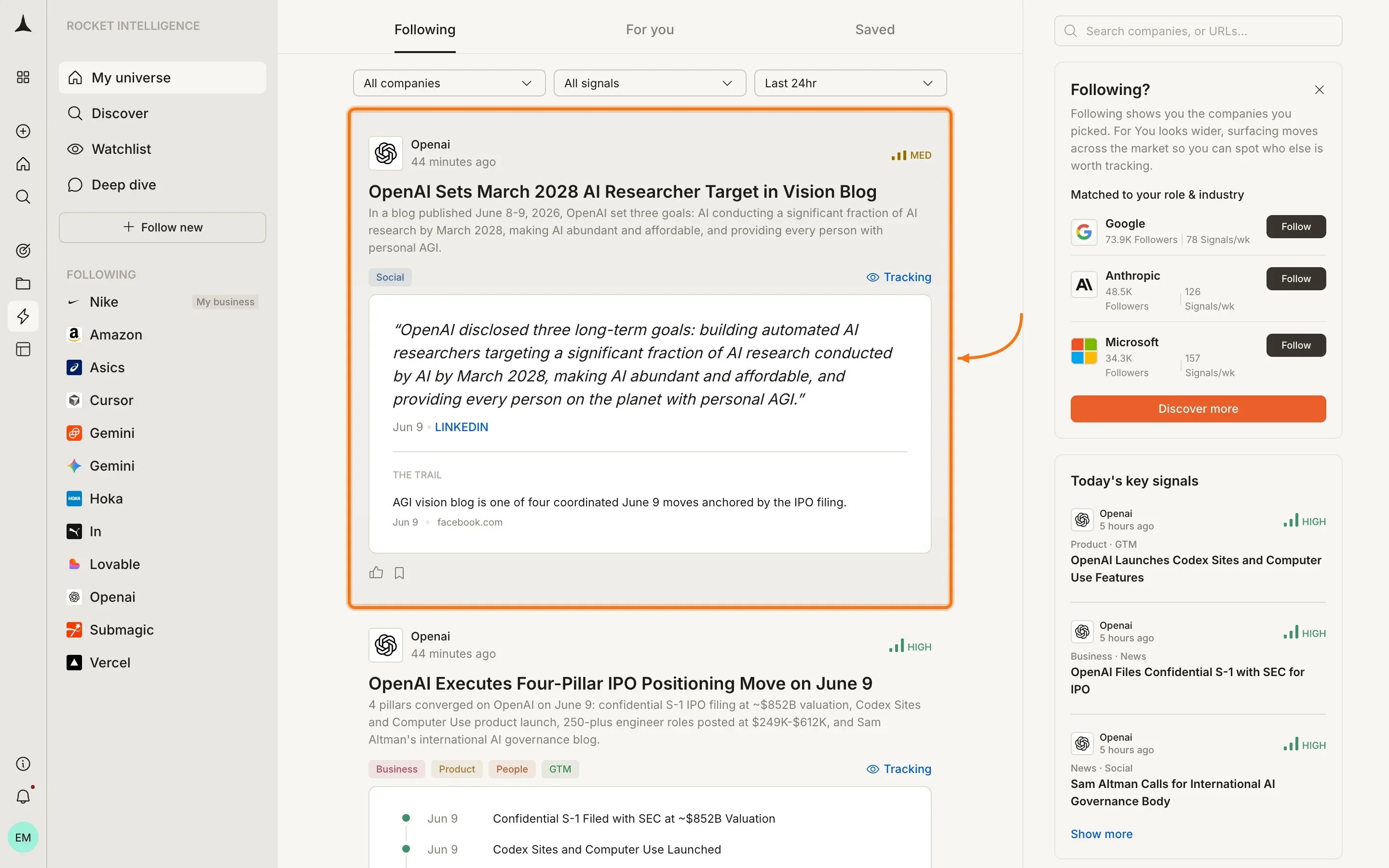
Every Intel card contains these elements from top to bottom:
| Element | What it shows |
| :----------------------------- | :------------------------------------------------------------------------------------------------------------------------------------------- |
| **Company name and timestamp** | Which company this Intel is about and when it was generated |
| **Magnitude badge** | High, Medium, or Low significance rating |
| **Headline** | A one-line summary of what happened |
| **Detail paragraph** | What was detected and its broader context |
| **Pillar tags** | Which pillars contributed signals (Business, News, GTM, People, etc.) |
| **Watchlist name** | If the Intel belongs to one of your watchlists, the watchlist name is displayed. Not shown if the Intel is not associated with any watchlist |
| **Tracking link** | Connects this Intel to the lens you set for the company |
| **Quoted evidence** | The raw source material supporting the interpretation |
| **The Trail** | The full evidence chain behind the Intel |
| **Feedback icons** | Thumbs up (quality signal) and bookmark (save for later) |
## Magnitude
Magnitude tells you how much a card matters relative to your priorities. There are exactly three levels:
| Level | Meaning |
| :--------- | :------------------------------------------------------------- |
| **High** | Material change that likely requires action or awareness today |
| **Medium** | Notable development worth monitoring over the coming days |
| **Low** | Incremental signal that contributes to a pattern over time |
Magnitude is personalized. The same underlying signal may be High for one user and Medium for another depending on their role, lens, and followed companies.
## Expanded view
Clicking on an Intel card expands it to reveal deeper analysis:
## Card anatomy
Every Intel card contains these elements from top to bottom:
| Element | What it shows |
| :----------------------------- | :------------------------------------------------------------------------------------------------------------------------------------------- |
| **Company name and timestamp** | Which company this Intel is about and when it was generated |
| **Magnitude badge** | High, Medium, or Low significance rating |
| **Headline** | A one-line summary of what happened |
| **Detail paragraph** | What was detected and its broader context |
| **Pillar tags** | Which pillars contributed signals (Business, News, GTM, People, etc.) |
| **Watchlist name** | If the Intel belongs to one of your watchlists, the watchlist name is displayed. Not shown if the Intel is not associated with any watchlist |
| **Tracking link** | Connects this Intel to the lens you set for the company |
| **Quoted evidence** | The raw source material supporting the interpretation |
| **The Trail** | The full evidence chain behind the Intel |
| **Feedback icons** | Thumbs up (quality signal) and bookmark (save for later) |
## Magnitude
Magnitude tells you how much a card matters relative to your priorities. There are exactly three levels:
| Level | Meaning |
| :--------- | :------------------------------------------------------------- |
| **High** | Material change that likely requires action or awareness today |
| **Medium** | Notable development worth monitoring over the coming days |
| **Low** | Incremental signal that contributes to a pattern over time |
Magnitude is personalized. The same underlying signal may be High for one user and Medium for another depending on their role, lens, and followed companies.
## Expanded view
Clicking on an Intel card expands it to reveal deeper analysis:
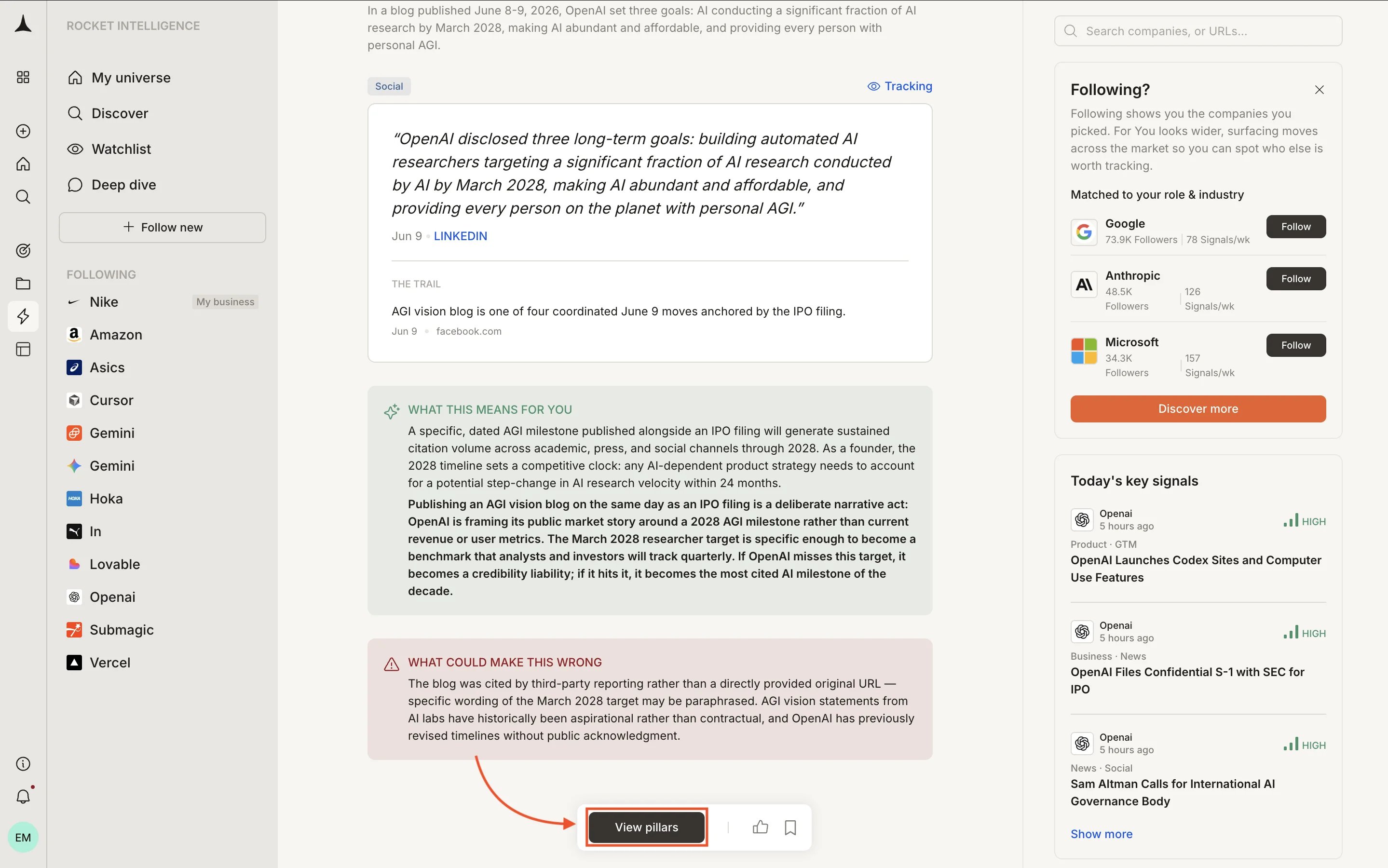
 The expanded view includes:
* **"What this means for you"**: a personalized implication connecting the signal to your specific role and business context
* **"What could make this wrong"**: alternative explanations or caveats worth considering before acting
* **View pillars button**: opens the full pillar navigation for that company so you can investigate further
## What every card includes
Every Intel card gives you full depth:
* **Headline** summarizing what happened
* **What it means**: interpretation of the underlying signals
* **Why it matters**: the business implication for you
* **Magnitude**: High, Medium, or Low significance rating
* **Evidence**: the specific signals that contributed
* **Trail**: full sources, methodology, and reasoning chain
* **Confidence score**: how strongly the evidence supports the interpretation
* **Counter-narrative**: alternative explanations worth considering
* **Connected signals**: related Intel from other pillars or companies
## How cards are ranked
Intel cards in your feed are not shown in chronological order. They are ranked by a combination of factors:
1. **Magnitude**: High-magnitude Intel surfaces first
2. **Your pins**: pinned companies get priority positioning
3. **Your lens**: the reason you watch each company weights which signals matter more
4. **Your role**: from your profile, used to prioritize relevant signal types
5. **Recency**: more recent Intel ranks higher when other factors are equal
## Interacting with cards
| Action | How | Result |
| :--------------- | :------------------------------------ | :--------------------------------------------------------------------------- |
| **Expand** | Click the card | Reveals full detail, personalized implication, and counter-narrative |
| **Save** | Click the bookmark icon | Adds the card to your [Saved](/intelligence/feeds/saved) collection |
| **Feedback** | Click thumbs up | Signals that this type of Intel is valuable to you (improves future ranking) |
| **View pillars** | Click "View pillars" in expanded view | Opens the company's pillar view for deeper investigation |
## What Intel cards are not
Intel cards are deliberately different from what other tools produce:
* **Not alerts.** An alert fires when a threshold is crossed. Intel interprets what the crossing means.
* **Not notifications.** A notification tells you something happened. Intel tells you what it means for your business.
* **Not raw data.** A data point is one number. Intel connects multiple data points across pillars into a coherent read.
The best way to build intuition for Intel cards is to scan your For You feed daily for one week. After a few days, the format becomes second nature and you will instinctively know which cards deserve deeper investigation.
## What's next
Intel from companies in your universe, surfaced daily.
Bookmark cards for meetings, decisions, or tracking signals over time.
Full terminology and mental model behind Rocket Intelligence.
How to read and act on Intel effectively.
The expanded view includes:
* **"What this means for you"**: a personalized implication connecting the signal to your specific role and business context
* **"What could make this wrong"**: alternative explanations or caveats worth considering before acting
* **View pillars button**: opens the full pillar navigation for that company so you can investigate further
## What every card includes
Every Intel card gives you full depth:
* **Headline** summarizing what happened
* **What it means**: interpretation of the underlying signals
* **Why it matters**: the business implication for you
* **Magnitude**: High, Medium, or Low significance rating
* **Evidence**: the specific signals that contributed
* **Trail**: full sources, methodology, and reasoning chain
* **Confidence score**: how strongly the evidence supports the interpretation
* **Counter-narrative**: alternative explanations worth considering
* **Connected signals**: related Intel from other pillars or companies
## How cards are ranked
Intel cards in your feed are not shown in chronological order. They are ranked by a combination of factors:
1. **Magnitude**: High-magnitude Intel surfaces first
2. **Your pins**: pinned companies get priority positioning
3. **Your lens**: the reason you watch each company weights which signals matter more
4. **Your role**: from your profile, used to prioritize relevant signal types
5. **Recency**: more recent Intel ranks higher when other factors are equal
## Interacting with cards
| Action | How | Result |
| :--------------- | :------------------------------------ | :--------------------------------------------------------------------------- |
| **Expand** | Click the card | Reveals full detail, personalized implication, and counter-narrative |
| **Save** | Click the bookmark icon | Adds the card to your [Saved](/intelligence/feeds/saved) collection |
| **Feedback** | Click thumbs up | Signals that this type of Intel is valuable to you (improves future ranking) |
| **View pillars** | Click "View pillars" in expanded view | Opens the company's pillar view for deeper investigation |
## What Intel cards are not
Intel cards are deliberately different from what other tools produce:
* **Not alerts.** An alert fires when a threshold is crossed. Intel interprets what the crossing means.
* **Not notifications.** A notification tells you something happened. Intel tells you what it means for your business.
* **Not raw data.** A data point is one number. Intel connects multiple data points across pillars into a coherent read.
The best way to build intuition for Intel cards is to scan your For You feed daily for one week. After a few days, the format becomes second nature and you will instinctively know which cards deserve deeper investigation.
## What's next
Intel from companies in your universe, surfaced daily.
Bookmark cards for meetings, decisions, or tracking signals over time.
Full terminology and mental model behind Rocket Intelligence.
How to read and act on Intel effectively.