> ## Documentation Index
> Fetch the complete documentation index at: https://docs.rocket.new/llms.txt
> Use this file to discover all available pages before exploring further.
# Presentable report
> Generate publication-grade HTML documents and interactive slide decks from Rocket.new Solve reports: polished deliverables ready for stakeholders.
export const LlmsDirective = () =>
For the complete documentation index, see llms.txt.
For a lightweight markdown version of this page, append .md to the URL.
;
Solve transforms your research into publication-grade outputs you can share directly with stakeholders. Ask for a polished HTML document, an interactive presentation, or a PRD, and Rocket produces it in one step. All formats are versioned and inherit password protection from the share settings.
For the best results, [refine your report](/solve/results/refine) before generating the presentable output. The output reflects whatever version of the report exists at generation time.
## Steps
Complete all edits and follow-up questions before generating the presentable output. The generator uses the latest version of your report as its source.
Type one of these prompts (or something similar) in the chat:
* "Generate a polished HTML report"
* "Generate a PPT presentation"
* "Create a slide deck from this report"
* "Create a PRD from this research"
Rocket analyzes the report content and selects the most appropriate theme automatically. The output appears as a downloadable file in the Documents panel.
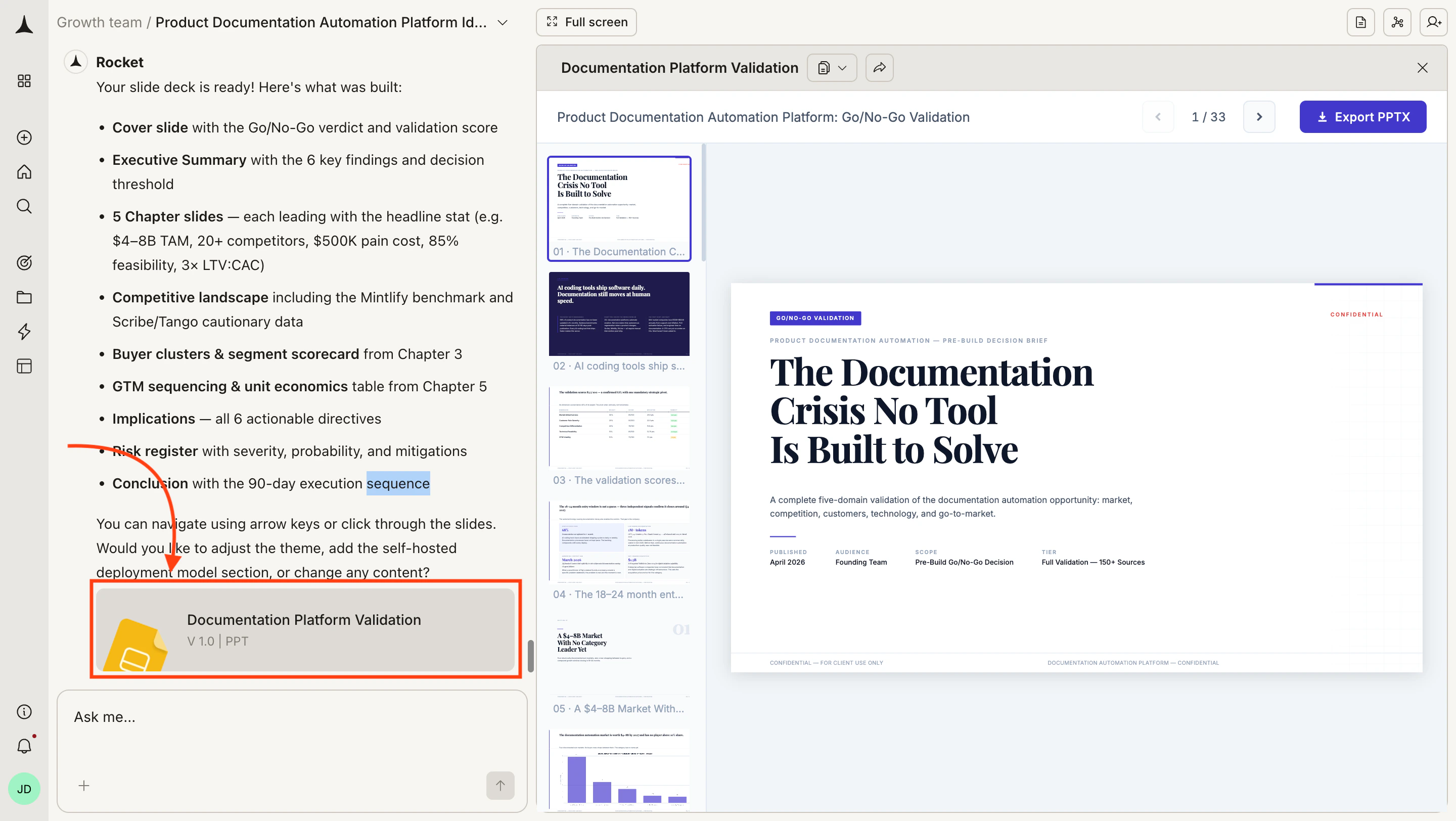
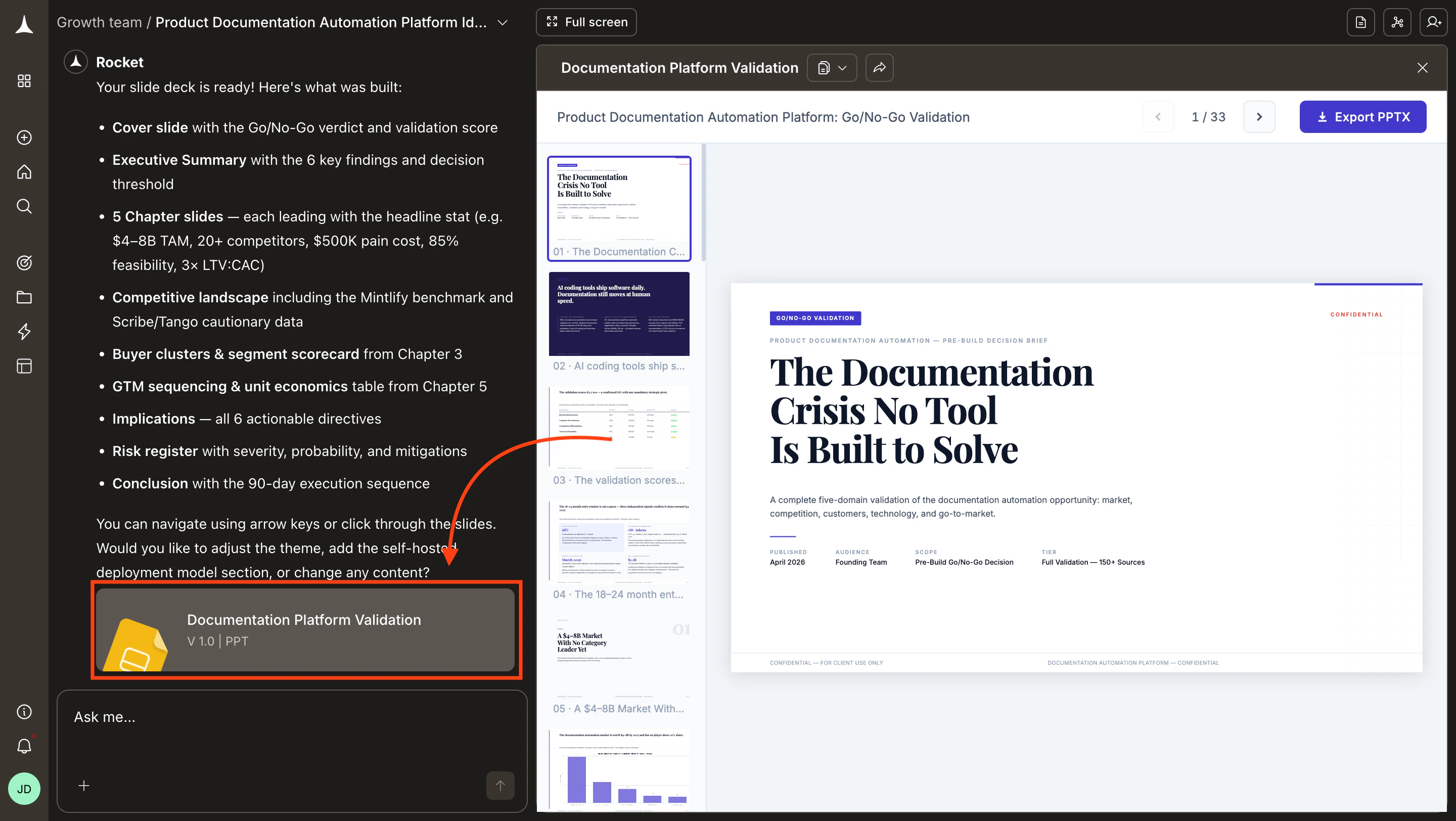 Open the file to preview it in the browser. If the output looks correct, [export or share it](/solve/results/share-and-export) from the Documents panel.
## Document output
The document format produces a paginated A4 layout suitable for printing or screen reading. Each document includes a cover page, table of contents, and professionally typeset pages.
Rocket selects the theme based on content type, but you can override it by specifying a theme in your prompt.
| Theme | Description |
| :------------ | :---------------------------------------------------------------------------------------------------------- |
| **Executive** | Clean, corporate layout with muted colors. Best for board presentations and investor updates. |
| **Technical** | Structured layout optimized for data-heavy reports. Emphasizes tables, code blocks, and diagrams. |
| **Academic** | Traditional academic formatting with citations and footnotes. Suits research papers and literature reviews. |
| **Minimal** | Sparse layout with generous white space. Works well for short summaries and internal memos. |
## Presentation output
The presentation format produces an interactive slide deck that runs in any browser. Navigation works with keyboard arrows, mouse clicks, and touch gestures. Each slide has a unique URL for deep linking.
Rocket chooses the layout for each slide based on the content it contains. Every deck starts with a hero title slide and uses section dividers to separate major topics.
| Theme | Description |
| :------------ | :----------------------------------------------------------------------------- |
| **Corporate** | Navy and white palette. Professional and understated. |
| **Dark** | Charcoal background with electric blue accents. Good for screen presentations. |
| **Gradient** | Bold gradient backgrounds. High visual impact for keynotes. |
| **Minimal** | Pure white background with black text. Maximum readability. |
| **Vibrant** | Teal and coral palette. Energetic and modern. |
## Export formats
All formats are versioned. Each generation creates a new version accessible from the Documents panel.
| Format | Output type | Use case |
| :-------------------- | :---------------------------- | :------------------------------------------------------- |
| **Document HTML** | Paginated HTML file | Share as a link or embed in internal tools. |
| **Presentation HTML** | Interactive slide deck | Present directly in the browser. |
| **PDF** | Static document | Print or distribute as a fixed-layout file. |
| **PPTX** | PowerPoint file | Edit further in PowerPoint or Google Slides. |
| **PRD** | Product requirements document | Hand off research findings as a structured product spec. |
## Tips
Tell Rocket what to include or exclude. For example: "Generate a polished HTML report, but skip the methodology section" or "Only include the executive summary and recommendations in the slide deck."
After generating, use the [share and export tools](/solve/results/share-and-export) to distribute the output. Shared links inherit password protection settings from your task.
## What's next
Share via link, export as PDF, or copy content to other tools.
Continue editing before generating a presentable version.
Open the file to preview it in the browser. If the output looks correct, [export or share it](/solve/results/share-and-export) from the Documents panel.
## Document output
The document format produces a paginated A4 layout suitable for printing or screen reading. Each document includes a cover page, table of contents, and professionally typeset pages.
Rocket selects the theme based on content type, but you can override it by specifying a theme in your prompt.
| Theme | Description |
| :------------ | :---------------------------------------------------------------------------------------------------------- |
| **Executive** | Clean, corporate layout with muted colors. Best for board presentations and investor updates. |
| **Technical** | Structured layout optimized for data-heavy reports. Emphasizes tables, code blocks, and diagrams. |
| **Academic** | Traditional academic formatting with citations and footnotes. Suits research papers and literature reviews. |
| **Minimal** | Sparse layout with generous white space. Works well for short summaries and internal memos. |
## Presentation output
The presentation format produces an interactive slide deck that runs in any browser. Navigation works with keyboard arrows, mouse clicks, and touch gestures. Each slide has a unique URL for deep linking.
Rocket chooses the layout for each slide based on the content it contains. Every deck starts with a hero title slide and uses section dividers to separate major topics.
| Theme | Description |
| :------------ | :----------------------------------------------------------------------------- |
| **Corporate** | Navy and white palette. Professional and understated. |
| **Dark** | Charcoal background with electric blue accents. Good for screen presentations. |
| **Gradient** | Bold gradient backgrounds. High visual impact for keynotes. |
| **Minimal** | Pure white background with black text. Maximum readability. |
| **Vibrant** | Teal and coral palette. Energetic and modern. |
## Export formats
All formats are versioned. Each generation creates a new version accessible from the Documents panel.
| Format | Output type | Use case |
| :-------------------- | :---------------------------- | :------------------------------------------------------- |
| **Document HTML** | Paginated HTML file | Share as a link or embed in internal tools. |
| **Presentation HTML** | Interactive slide deck | Present directly in the browser. |
| **PDF** | Static document | Print or distribute as a fixed-layout file. |
| **PPTX** | PowerPoint file | Edit further in PowerPoint or Google Slides. |
| **PRD** | Product requirements document | Hand off research findings as a structured product spec. |
## Tips
Tell Rocket what to include or exclude. For example: "Generate a polished HTML report, but skip the methodology section" or "Only include the executive summary and recommendations in the slide deck."
After generating, use the [share and export tools](/solve/results/share-and-export) to distribute the output. Shared links inherit password protection settings from your task.
## What's next
Share via link, export as PDF, or copy content to other tools.
Continue editing before generating a presentable version.